Hi and thanks for further information.
1.that number is what FPS the camera is viewed in NCS. To find the recording FPS play the file in VLC and go to Tools and then Codec information.
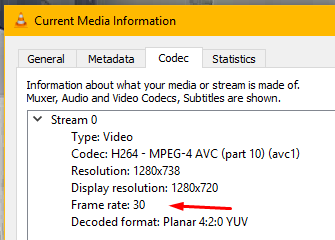
There you will see the recorded FPS.
2.Nice CPU. That will not be a limitation 
3.You probably run NCS X (the blue icon). NCS can also be run as a Service in the background which is good since you don’t have the console up. You control NCS Service with the Windows client (red icon).
4.Nice camera. Be aware of that NCS focus on IP cams and there is a limitation on the number of cameras that can be used when using USB cameras of exactly the same model.
Back to 1. That FPS number depends on many things. In Settings - Client settings you set the FPS in different viewing modes to save CPU load.
-Henrik