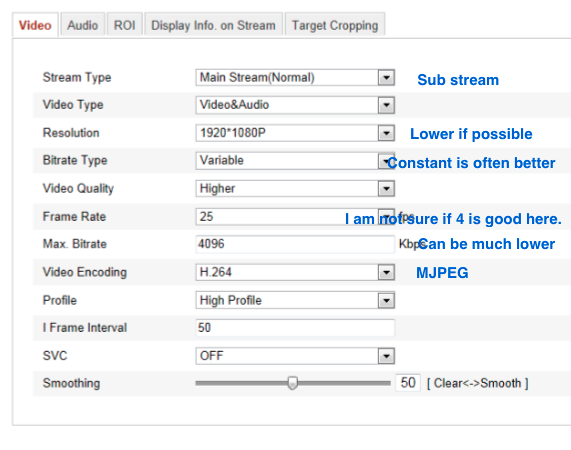
Next part is to go from rtsp to mjpeg.
In the camera change in the settings below (see picture):
- To get mjpeg Stream Type must be set to Sub-stream.
- Resolution is maybe automatically lower now when it is mjpeg.
- Bitrate is often better to have as constant, but leave it at Variable for now.
- Frame Rate. I am not sure if it best to set it to 25 here or 4 FPS. You have to test.
- Max Bitrate can be much lower, but leave it for the moment.
- Video Encoding is set to MJPEG. That is possible now when Sub-stream is used.
- Save.
Next is to change in NCS.
- add camera as Custom URL and set Stream Type to MJPEG.
- For address type
http://username:password@ip/Streaming/channels/ID/httppreview
According to Hikvision the ID is 2 or 102 to get the MJPEG stream.
If you put the URL directly in a browser you should get a login to the camera. The correct URL is always the tricky part.
When this works you can go back and start the Motions detection on more cameras and at the same time look at the CPU load.
Good luck and report back what happens :).
-Henrik